Introduction
QA Pilot contains x-ray and electron output tests for both daily and monthly QA purposes. If you are using a daily QA device that does not convert electrometer readings to dose or an ion chamber and electrometer combination you will have to establish a set conversion factors to convert raw readings to dose. Note that some daily QA devices such as the Standard Imaging QA BeamChecker+ and the Sun Nuclear Daily QA 3 perform this conversion internally. In these cases, QA Pilot is retrieving the dose data from the respective databases and no further conversion is required.
These conversion factors will have to be established for each unique measurement system where a measurement system is defined as a unique combination of:
- Linac
- Energy
- Chamber (or chamber system e.g., Fluke)
- Electrometer
- Measurement Setup (Build up, Depth, etc.)
These conversion factors should not be confused with the traceable calibration factors established for the individual components by ADCL calibrations.
The conversion factors at the various energies will be saved with the individual measurement devices record. You will have to ensure that your measurement setup is consistent from measurement to measurement.
When you establish your QA protocol, you will select the measurement device that you will use to perform the QA and the energies at which you will perform the QA.
As you perform the QA you will enter the raw electrometer readings into QA Pilot along with the current temperature and pressure conditions for each energy you configured in your setup. The raw readings will then be converted to dose and compared against your baseline measurements.
Your baseline target for output can be set to either dose or dose per MU (typically 100 cGy or 1 cGy/MU). Your baseline will generally remain constant as this baseline is what your TPS is assuming when creating treatment plans.
Establishing Initial Conversion Factors
The most common way to establish an initial set of conversion factors is from annual TG51 or TRS-398 measurement data as you have a water tank reference for absolute dose at various energies. Typically several ion chamber measurements are made for each energy with the same setup used for the monthly output tests and averaged to establish the conversion factor.
Example
- Three measurements are recorded 15.5, 15.6 and 15.4 nC with a particular chamber at 6X.
- The output as measured by the water tank is 100.2 cGy.
- The output test is conducted using 100MU.
- The atmospheric conditions are 23℃ and 1015 hPa. Note that QA Pilot uses hPa as the measurement unit for pressure.
CTP = (273.2+23)/(273.2+22)* 1013.3/1015 = 1.0017
Conversion Factor:
CF = Output/MU*Beam Monitor Units/ (Mean electrometer reading) x CTP = 1.002 cGy/MU*100MU/(15.5 nC *1.0017) = 6.4535 cGy/nC.
This process will be repeated for each energy that will be measured on the device. It may also be beneficial to establish the conversion factors for a second measurement device to aid in troubleshooting variations detected in daily and monthly tests.
NOTE: The example above assumes that the electrometer is configured to display in nC. Your device may be configured to display in other units. You need to calculate the conversion factor to produce the final dose appropriately for the units displayed by your device.
Adding Measurement Devices and Conversion Factors
To create a new piece of QA equipment in QA Pilot click the Manage link on the main toolbar and then the Measurement Devices link on the Manage your QA page. The Manage Measurement Devices page will open. To add a new piece of measurement device click the + Add device Button.
Remember that each measurement device represents the whole measurement system. The label and the description should reflect this. In the example below the combination of the chamber and the electrometer is noted. It may also be helpful to note relevant details of the device and setup in the device description.
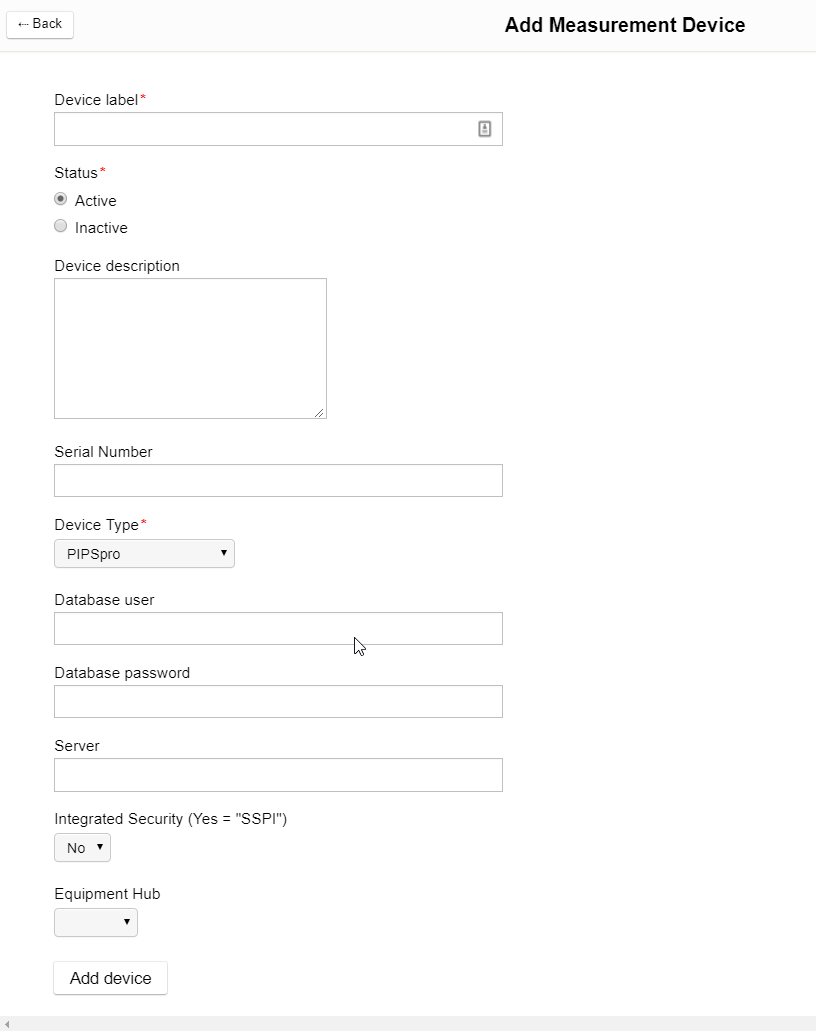
Once you have entered the details of the equipment click the Add Equipment button. The new equipment will be added to your list of equipment. To add the calibration factors to convert the raw readings to dose click the Conversion Factors button at the top of the page. Click the Edit Calibration button for the device for which you want to add new factors. Click the +Add Machine Calibration button to add conversion factors for each energy that you will be testing.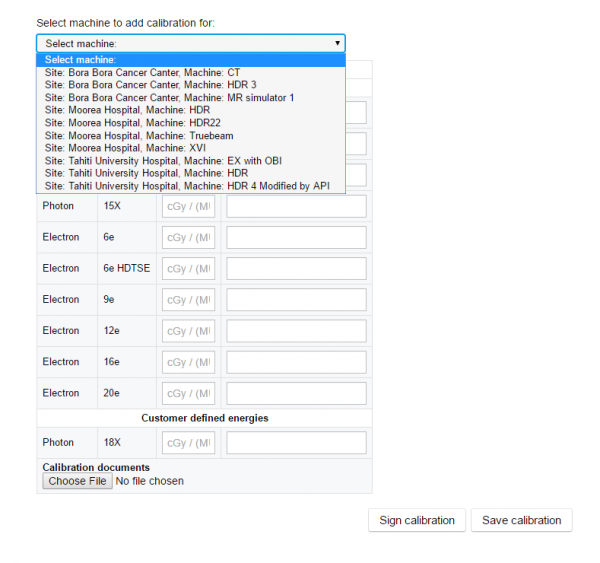
Choose the machine for which the conversion factors are being added. Enter in a conversion factor for each energy you wish to test. You can set an expiration date for the calibration and you will receive an email reminder before the calibration is due. You may optionally attach a calibration document for the device to aid in your machine management. Before saving the conversion factors you must provide a digital signature by clicking the Sign calibration button.
Click the Save calibration button to save the conversion factors. Once conversion factors have been added they can be updated by clicking the Update Machine Calibration button.
Integrating Conversion Factors into QA Schedules
Once a template has been scheduled for a machine the equipment can be assigned to the schedule using the QA settings link from the Manage Service page. Click on the scheduled QA template to open the QA settings page.
Select the specific measurement device that will be associated with the QA and pre-set as many of the other settings as you wish for the QA schedule. You will also select the units for the output (cGy or cGy/MU). If you are using a direct connection to a supported QA device you will have to install the Equipment Hub to connect to it.
Setting Baselines for Output
Generally, you will want to set baselines and tolerances for your daily and monthly output measurements. The baseline and tolerances manager can be accessed and set from the Manage Services page.
If you set your units in the QA settings to cGy you will want to set your baseline to an absolute dose amount (typically 100 cGy). If you set your units to be cGy/MU you will want to set your baseline to the dose per MU expected by your TPS (typically 1 cGy/MU).
Entering or Retrieving Data
After you have configured your templates and conversion factors you can use your scheduled template to enter data. New data entry will be done from the QA Pilot Schedules page.
If you are entering data from a directly connected daily QA device a button labeled Get results will be present to retrieve the data. If the device required conversion factors these will be applied to the raw data.
If you are entering output data manually from an ion chamber array you can enter and average up to 3 readings. The application of the conversion factor when calculating the output varies depending on whether the units are cGy or cGy/MU.
cGy: Output = Cf x CTP x Raw Reading
cGy/MU : Output = (Cf x CTP x Raw Reading)/MU Delivered
The readings will automatically be converted and compared to your established baselines. Failures against baselines will automatically generate email alerts on the failures.
Ongoing Management of Conversion Factors
- Once conversion factors and baselines are established it is important to maintain a consistent protocol for trends and comparisons over time to be meaningful.
- If daily or monthly measurements show significant deviations from baseline or previous measurements investigation into possible changes in the measurement system should be done before considering machine adjustments.
- Adjustments to conversion factors should only be performed if you have a reason to believe that the measurement system has changed. Although TG-51 and TRS-398 measurements may reveal machine output or measurement system changes they do not by themselves constitute a reason to adjust conversion factors. Adjusting conversion factors without having identified an underlying cause can mask a deteriorating measurement system.
Comments
0 comments
Please sign in to leave a comment.